Skip to content
What's new

Hovera grows with stables

This is where we keep the history of what we ship. Every commit that touches the customer has an entry.

Feature

Daily plan, care instructions, a shared tablet with PINs and bookings without phone calls

Grooms get one screen with today's work and tick off feeds and care instructions — also on a shared tablet with personal PINs, and without signal. Clients book lessons, the arena and the walker themselves, and the yard confirms a request with one click.

Day plan. Feeds, care instructions, rides, arena bookings and vet visits on one list, in time order. A groom taps “tick off” next to a horse, or “Tick off all” for the whole feed; everyone sees who did it and when.
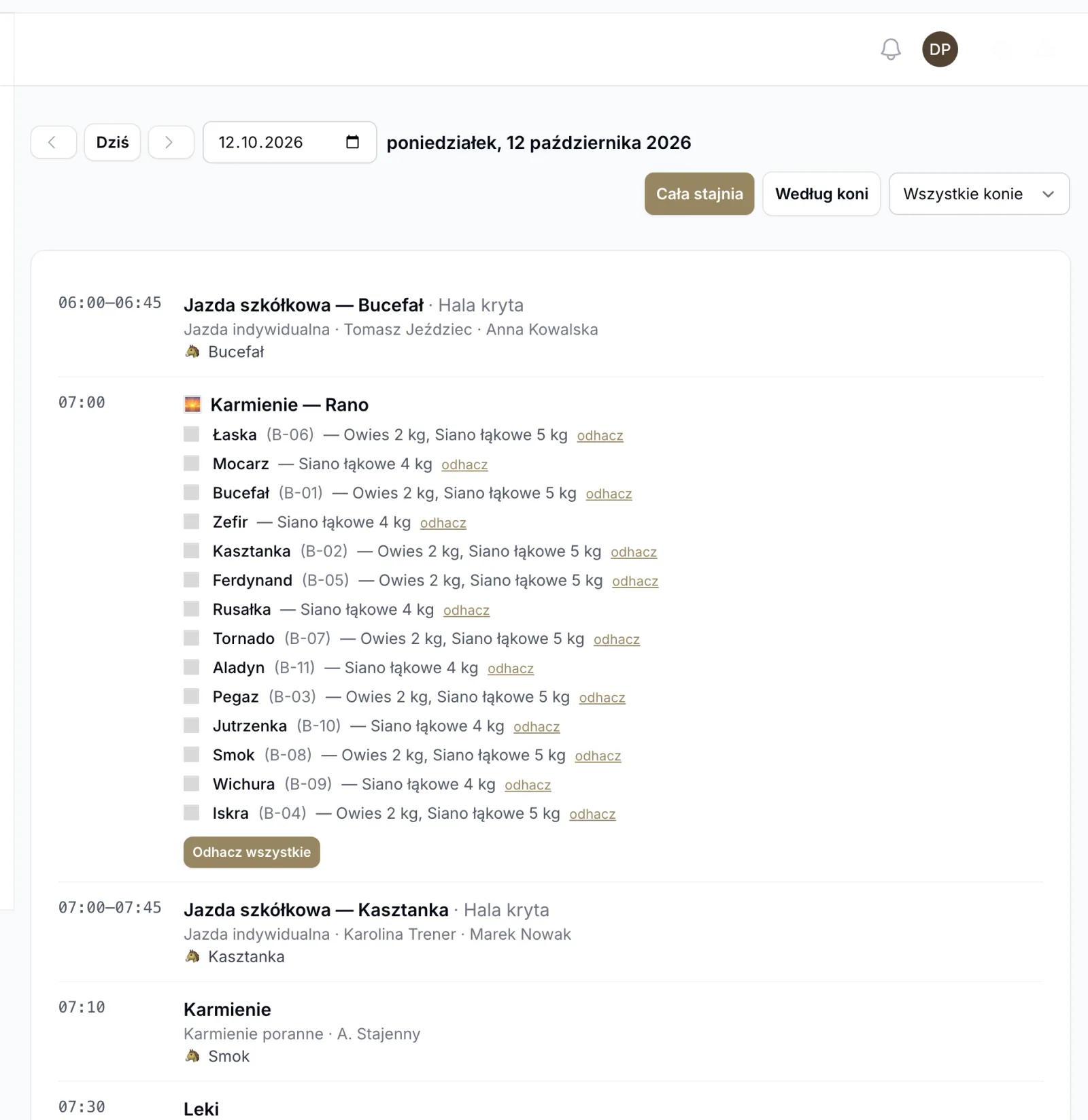
The yard’s day plan

Care instructions. On the horse’s card you set standing instructions: medication, turnout, walker, solarium, rugs, cold hosing — every day or on chosen days, for the length of a treatment. Grooms tick them off with times (“out 11:00, back 11:30”) or mark them “Not done” with a reason.
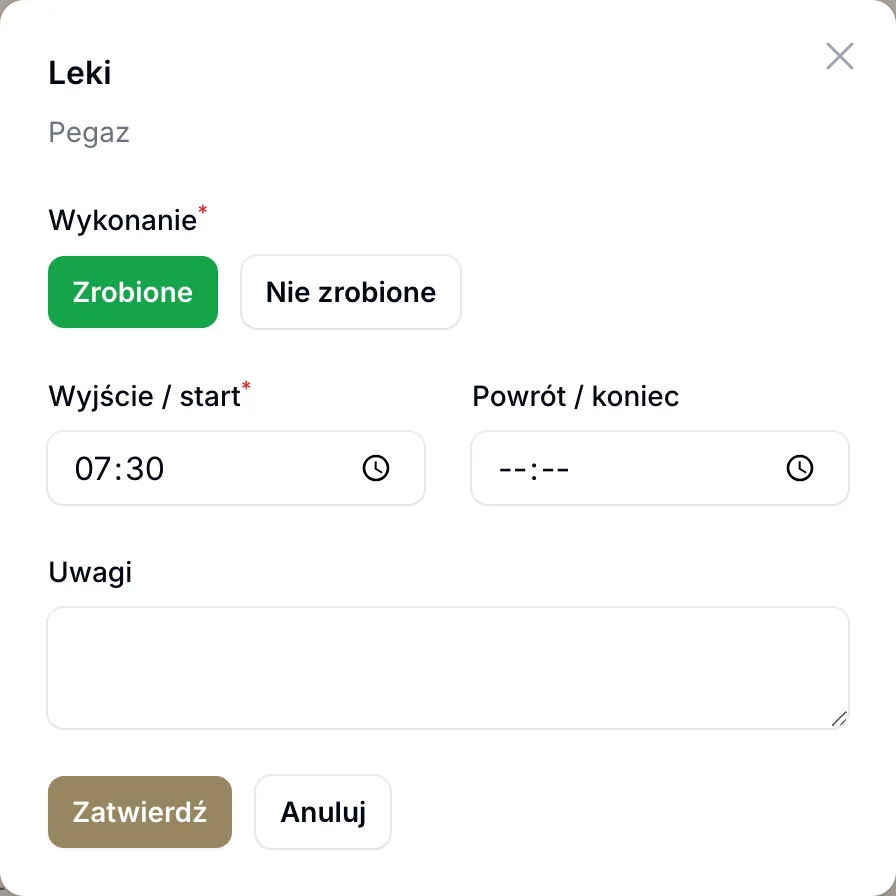
Ticking off a care instruction

Shared tablet with PINs. One tablet in the feed room instead of an account for every groom. Before each entry the groom picks their name and enters a PIN, so you know who fed and who gave the medication. The manager sets PINs under “Staff & PINs”.
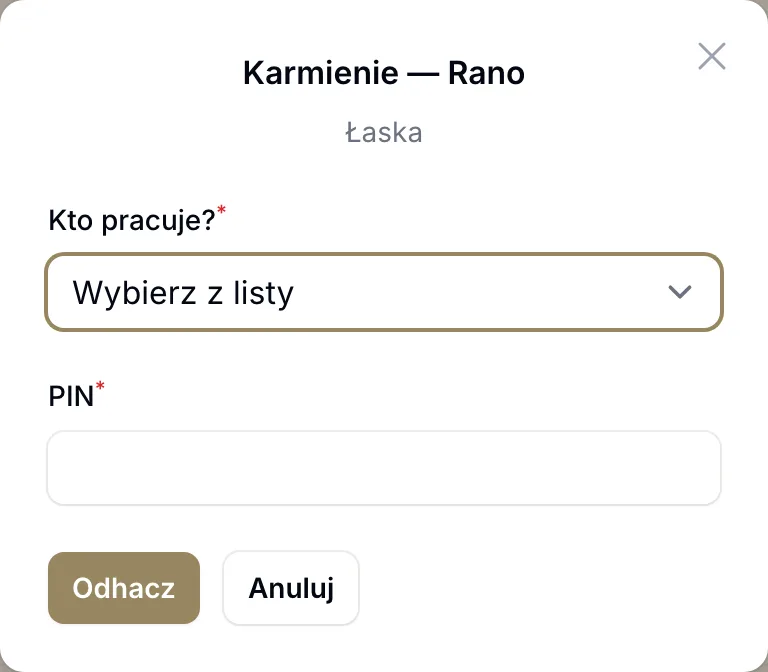
The tablet asks who is working

No signal, no problem. The Android app works the daily plan out on the phone; tick-offs, log entries and feed issues wait until the network is back.

Bookings. Clients book lessons and the indoor school, the outdoor arena or the walker in the portal, in the app and — if the yard allows it — on its public page, outsiders included. A place booking is accepted at once if there is room. The yard confirms or declines a lesson request with a button in the bookings list, and the menu shows how many requests are waiting.
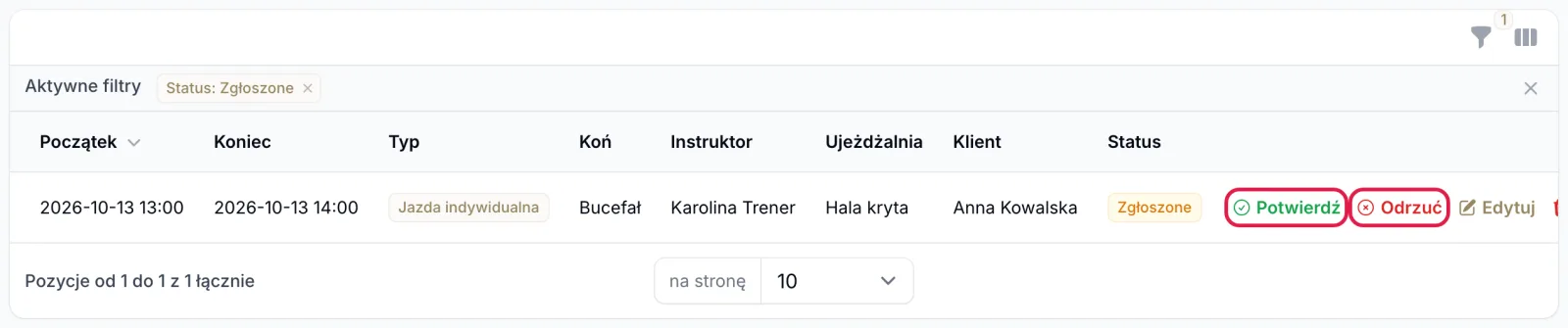
A lesson request waiting for confirmation

Invoice correction creates a draft with reversed lines — keep what you are correcting and issue it.

Step-by-step guides with screenshots are in the panel under “Help” and at app.hovera.app/help.

Feature

Horse workload limits and the “Horse workload” page

Set a maximum number of rides per day and per week, and minutes of work per day, for each horse. The panel warns before a horse goes over, the client portal won't let it happen, and a new page shows every horse's week.

Set the limits on the horse card, in the “Horse workload” section. An empty field means no limit.

  • Three limits. Maximum rides per day, maximum minutes of work per day and maximum rides per week, counted Monday to Sunday.
  • What counts. Private lessons, group lessons (the participant’s horse, absentees excluded) and training sessions. Cancelled sessions, grooming, vet and farrier visits don’t count.
  • Stable panel. Saving over the limit shows a warning. If the horse should work anyway, tick “Save despite exceeding the horse work limit”; the override goes to the change log.
  • Client portal and app. A client can’t book a horse over its limit; they see “This horse already has its full number of rides that day”.
  • Recurring lessons skip the dates where the horse would go over the limit and list what they skipped.
  • The “Horse workload” page. A table of horses and weekdays with a week switcher. From 75% of the limit a cell turns amber, over the limit red.
  • The horse card shows the current state, for example “This week: 9/14 rides · Today: 1/2 rides”.

We also corrected the sport and breeding pages. Hovera has no training programmes with cycles or training-load analysis, no FEI or national federation integration, no breeding calendar, pedigree tree or foal journal. The pages now describe what works: workload limits, the horse card, the health record with reminders and documents.

Improvement

New pricing: a free stable plan, a free carrier listing, no onboarding fee

A small stable and a carrier getting started use Hovera for PLN 0. Paid plans start at PLN 99 for stables and PLN 149 for carriers per month, net. No plan has an onboarding fee.

Pricing from 5 October 2026. All amounts net; you pay net + 23% VAT. Details on the pricing page.

  • Stables. Stable Free PLN 0 (10 horses, 25 clients, no invoicing, online payments or SMS), School PLN 99, Livery PLN 249, Centre PLN 499 a month, Enterprise from PLN 999. Paid plans share the same modules and differ in limits.
  • Carriers. Listing PLN 0 (directory, public page, requests addressed to you, calculator), Transport Start PLN 149, Pro PLN 349, Business PLN 699 a month. No commission per trip.
  • Horse owners — always PLN 0.
  • No onboarding fee. If you want us to set up your stable, “Hands-on onboarding” costs PLN 690; it is free with yearly Livery or Centre.
  • After the trial the account moves to the free plan instead of being blocked: a stable to Stable Free, a carrier to Listing.
  • A year costs 10 months on every paid plan.
  • Founding customers: the first 20 stables and 10 carriers pay half price for 12 months, until 31 March 2027.
Feature

Self-service data export, enforced plan limits and carrier blocking after the trial

You download your company's data yourself in the panel, plan limits are enforced in the system, and a carrier account without a paid plan is blocked immediately after the trial. Terms 1.6 and privacy policy 1.8 describe the same.

Three changes in how the system works, described in Terms 1.6 and privacy policy 1.8 (both effective from 1.10.2026).

  • Data export in the panel. Under Settings → Data export the account owner and administrator download a ZIP archive: CSV files with the contents of the company’s tables, summaries, a calendar in ICS format (stables) and attachments. The archive contains no passwords, tokens or keys. Limits: 3 exports per day, a link valid for 24 hours, attachments up to 25 MB per file and 250 MB in total. Export also works after the trial without payment, while suspended for an unpaid invoice and when blocked for non-payment. For administrative suspension and after the account is cancelled we supply the data on request by email. After the agreement ends we keep the data for 90 days (previously 30).
  • Plan limits. Once a limit is reached, no further item can be added above it; existing data and access stay unchanged, and changing plan raises the limit. For stables the limits cover horses, clients, users and file storage; for carriers — drivers, vehicles, clients, quotes per month and file storage. All plans have the same modules and differ in limits; the values are on the pricing page. Usage is shown on the billing screen, with a warning from 80%.
  • Carrier blocking after the trial. The account of a transport company that has no paid plan after the 30-day trial is blocked immediately, with no grace period. After logging in you see a non-payment message, contact details and — with an open invoice — a payment button. The account is unblocked by paying the invoice or by choosing and paying for a plan. Data export remains available.

Billing and payments are always in Polish zloty; prices in other currencies shown in the app for the transport plans are indicative only.

Fix

Corrections to feature and pricing descriptions

We aligned the pricing, terms and site descriptions with how Hovera actually works. Below are corrections to earlier entries.

We reviewed the site and documents against how the system works. Earlier entries stay as they are, as a historical record, but some of the descriptions in them do not match the offer:

  • Pricing plans. The Hovera 1.0 entry lists Free and Solo plans. They are not offered. The current offer for stables is Start, Stable, Pro and Enterprise; for transport companies — Transport Start, Pro, Business and Enterprise. Prices are in Polish zloty, net; you pay net + 23% VAT. A year costs ten months.
  • Public API and webhooks. Not available. The REST interface serves the mobile app and is not a public API for customers.
  • Accounting integration and export to iFirma, Wfirma, Comarch, Saldeo. Hovera has no such direct exports. For accounting we prepare JPK_FA(3) on request.
  • Import from other systems. You load data from Excel or CSV files (clients and horses) or from the onboarding workbook.
  • Trial. It lasts 30 days. For a stable it counts from account creation (trial limits: 10 horses and 5 clients); for a transport company, from positive verification of documents.
  • Availability. We do not offer a contractual 99.9% SLA or 24/7 support. The terms provide for best efforts at 99.5% monthly availability, and support runs on business days, 9:00–17:00.

The changes to the terms are described in the note at the top of the document.

Feature

ERP export for invoices — iFirma, Wfirma, Comarch

Your accountant picks the format, gets the invoice batch in their platform, you don't email anything. JPK_FA, JPK_VAT, plain text — all ready.

Supported systems

  • iFirma (direct API export)
  • Wfirma (CSV + XML export)
  • Comarch ERP / Optima (XML JPK_FA)
  • Saldeo (import-ready)
  • Streamsoft (CSV)
  • Generic format (CSV, XML, JSON)

How to enable

Settings → Integrations → Bookkeeping export → pick a system. Your accountant gets an email invite.

Feature

Hovera 1.0 — public launch

After 6 months of early access, Hovera launches publicly. 4 plans, Polish-first, ready to manage operations for equestrian stables.

Thanks to the 38 stables that tested Hovera over the past six months. Their feedback became the product we present today.

What you get in 1.0

  • 6 product modules (Calendar, Passes, Invoicing, Horse journal, Booking, AI in beta)
  • 4 pricing plans (Free, Solo, Stable, Pro)
  • Full bookkeeping export
  • Public API + webhooks (Pro)

Thank you for being here. Let’s go.

— Przemek

Want a monthly digest?

Subscribe to newsletter